





Signing Order In Documents & Contracts

June 17, 20241 min read

A small business owner needs to send a contract to multiple stakeholders for approval. With the Signing Order Management feature, they can specify the order in which each party needs to sign, ensuring a smooth and organized approval process.

Signing Order In Documents & Contracts: This feature allows businesses to manage the signing order of documents and contracts, enhancing control and efficiency in the document signing process.

⭐️ Why Does It Matter To Your Business?

  • Enhanced Control: Businesses can now define the sequence in which recipients sign documents, ensuring compliance with specific signing orders and workflows.

  • Streamlined Workflow: The drag-and-drop functionality enables businesses to easily reorder signers, optimizing the document signing process and saving time.

  • Improved Efficiency: With sequential email triggering, the system automatically sends documents to the next signer in the designated order, reducing delays and expediting document approvals.

⭐️ How To Use Signing Order In Documents & Contracts:

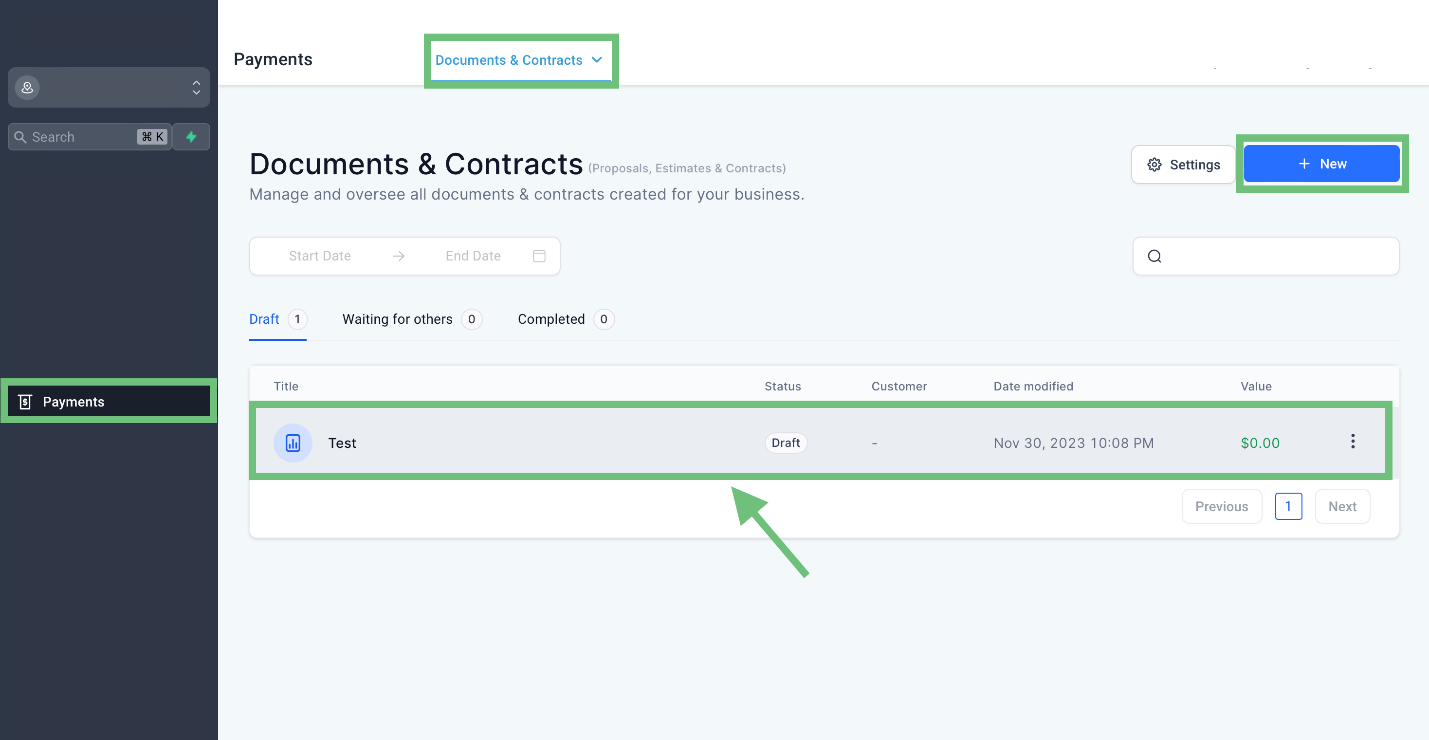
  1. Access the “Payment” tab from the left navigation menu, click on “Document & Contracts” from the upper navigation menu, and click on “+ New” or edit the existing one.
A screenshot of a computerDescription automatically generated
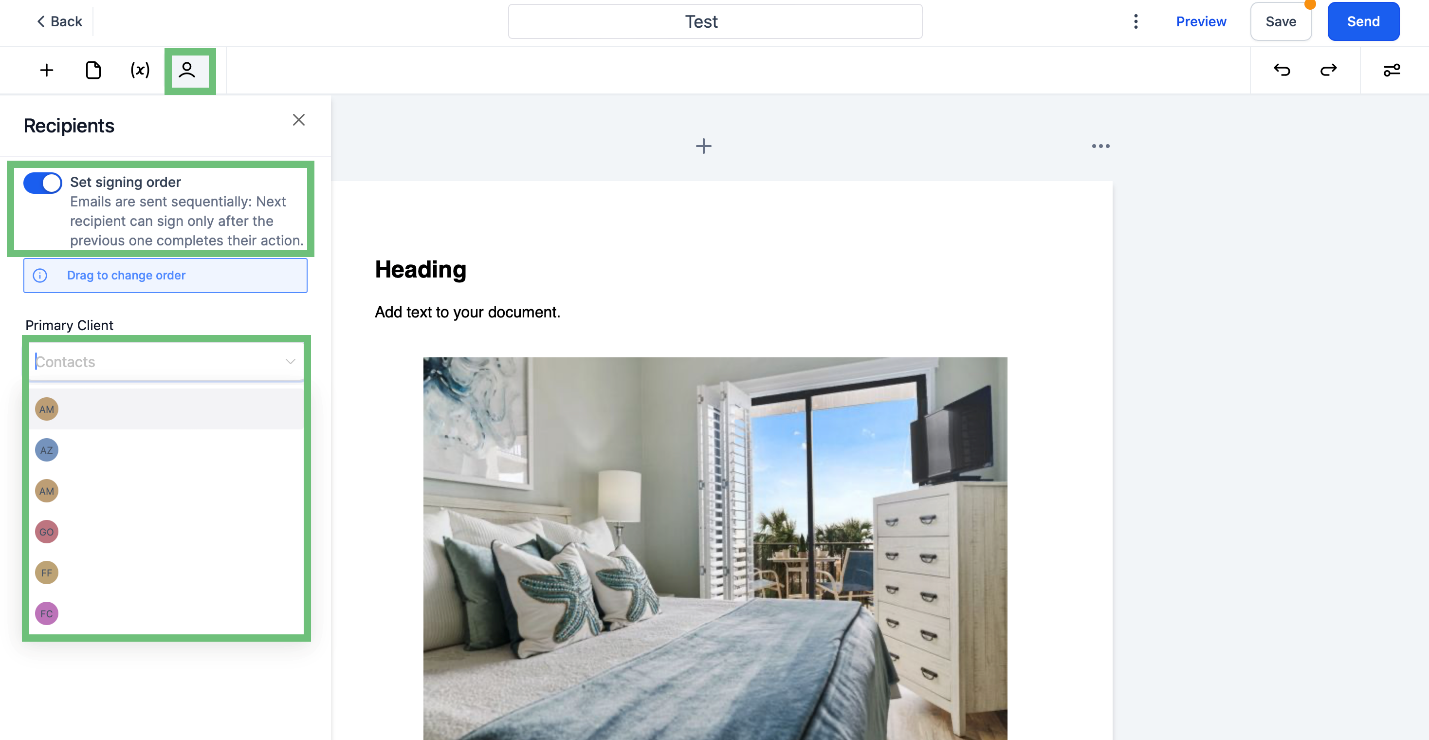
  1. In the builder, click on the Recipients icon, turn on the toggle, and select the required client.
    A screenshot of a bedroomDescription automatically generated
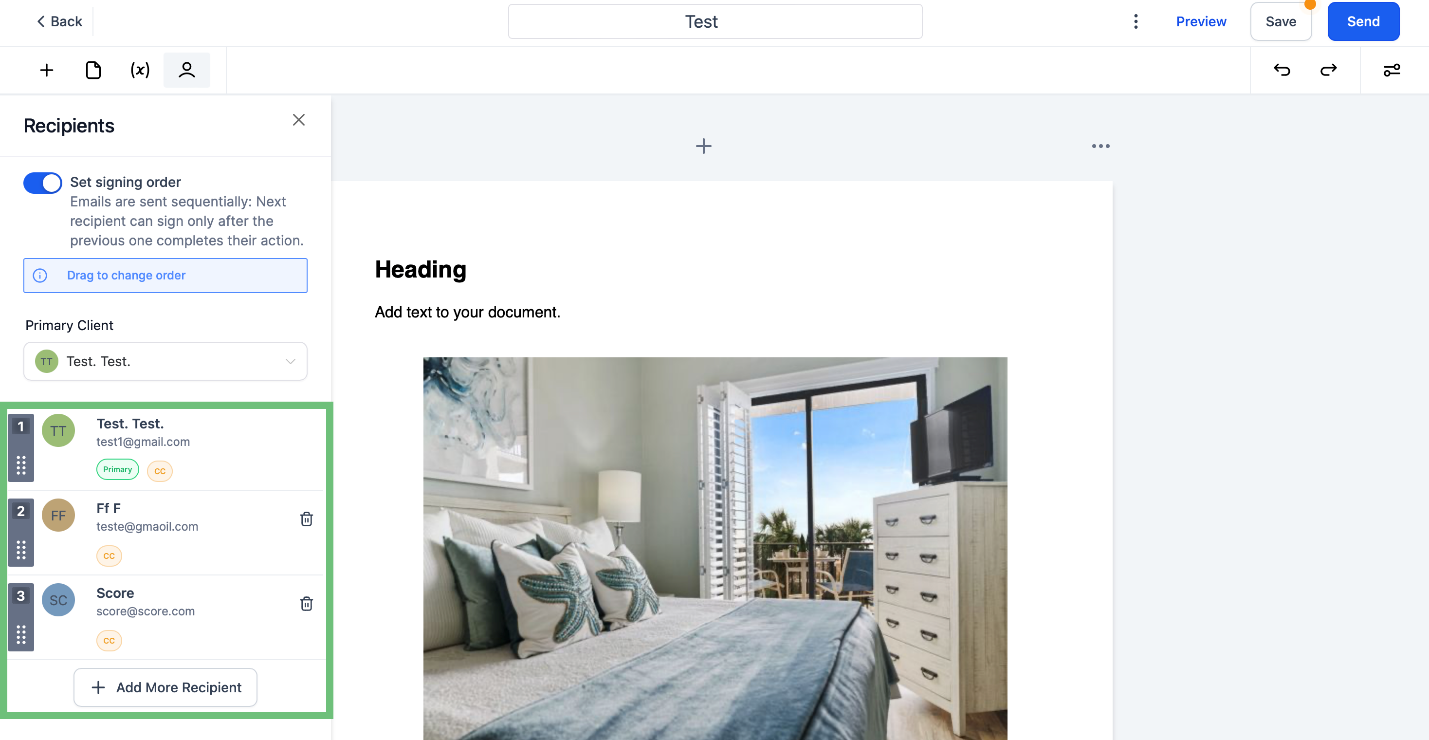
  1. Here, you can see the added recipients. To add more, click on “+ Add More Recipients.”
A screenshot of a bedroomDescription automatically generated

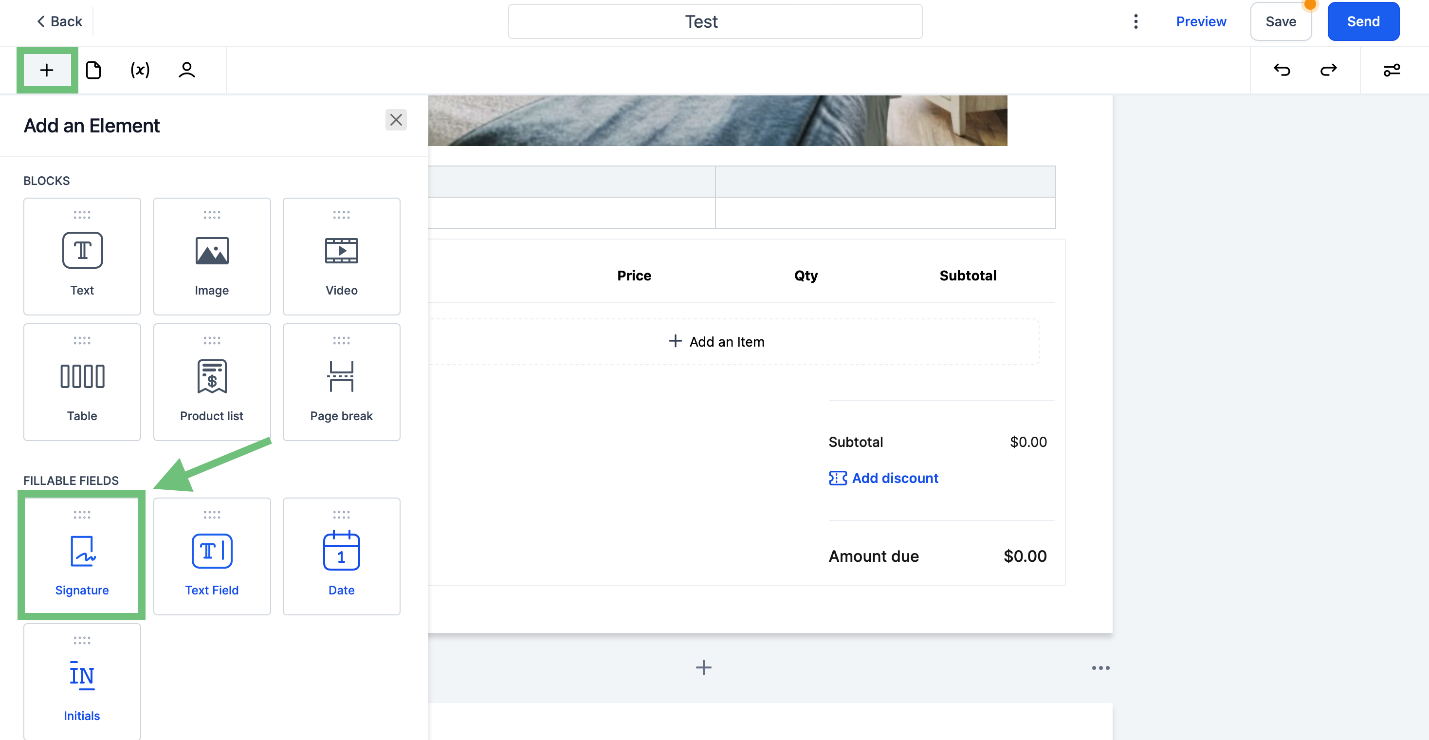
  1. Click on the “+” icon and add the signature element from the element list by drag and drop.

    A screenshot of a computerDescription automatically generated
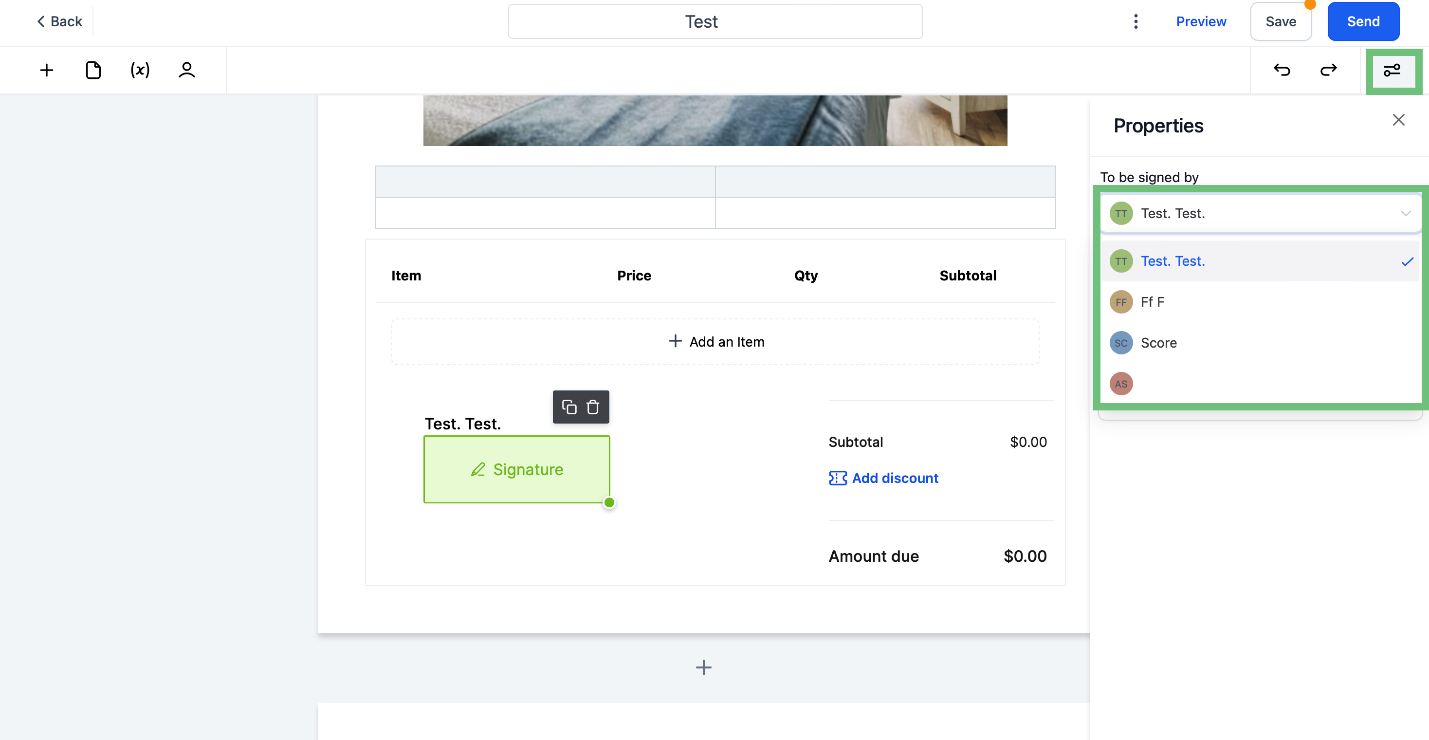
  2. Click on the added signature element and click on the Properties icon. Here you can see all the added recipients and select “To be Signed by” from the list.
    A screenshot of a computerDescription automatically generated

With this feature, businesses can exercise greater control over the document signing process, streamline workflows, and improve efficiency within the CRM, ultimately leading to smoother operations and faster document approvals.

Pinnacle AI, founded by Charles Higgins, specializes in customer relationship management (CRM) solutions. It aims to provide intuitive and powerful CRM software for businesses of all sizes, focusing on simplification and efficiency. Leveraging AI and machine learning, Pinnacle AI's platform offers automation, data analytics, and customer insights to enhance business-customer relationships. The company's core values include honesty, integrity, teamwork, and personal growth, fostering a culture of collaboration and ethical practices. Pinnacle AI stands out for its user-friendly approach and commitment to innovation in the CRM sector.

Pinnacle Ai

Pinnacle AI, founded by Charles Higgins, specializes in customer relationship management (CRM) solutions. It aims to provide intuitive and powerful CRM software for businesses of all sizes, focusing on simplification and efficiency. Leveraging AI and machine learning, Pinnacle AI's platform offers automation, data analytics, and customer insights to enhance business-customer relationships. The company's core values include honesty, integrity, teamwork, and personal growth, fostering a culture of collaboration and ethical practices. Pinnacle AI stands out for its user-friendly approach and commitment to innovation in the CRM sector.

LinkedIn logo icon
Instagram logo icon
Youtube logo icon
Back to Blog
Image

Innovation

Fresh, creative solutions.

Image

Integrity

Honesty and transparency.

Excellence

Excellence

Top-notch services.

FOLLOW US

Copyright 2025. Pinnacle Ai. All Rights Reserved.


