





Publish Instagram Stories via Push Notifications for Faster Scheduling

Photo by Mariia Shalabaieva on Unsplash
Overview
Instagram Stories use native features like music, stickers, and interactive elements that must be added inside the Instagram app. We built a workflow that lets teams schedule Stories from the CRM while finishing the creative in the app at publish time. That keeps your timeline organized and preserves the flexibility of Instagram’s native tools.
How the workflow works
The process is simple. Create the post in the CRM, mark it as an Instagram Story, turn on push notifications, add clear instructions for the publisher, and schedule the post. At the scheduled time, the publisher receives a push notification, opens the draft in the Instagram app, adds music or stickers, and posts.
Step-by-step: Schedule an Instagram Story and finish on the app
Create a new post and choose Instagram as the social network.

Pick the Instagram account you want to post from the account picker.
Select Stories under the Instagram options so the CRM knows this will publish as a Story.
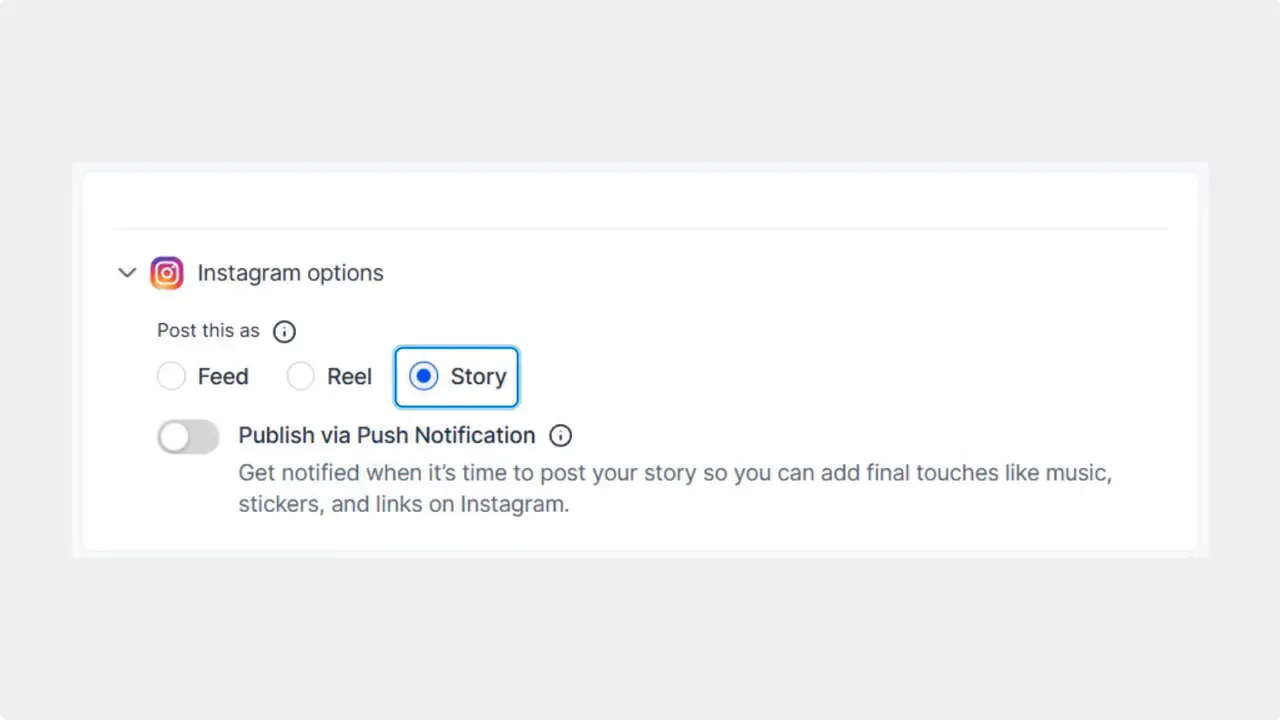
Select 'Story' under Instagram options to mark this post as a Story.
Toggle Publish via Push Notification on. This sends a push at the scheduled time so the publisher can finish the Story inside Instagram.
Add instructions in the Note to the Publisher. Use this field to specify music, stickers, hashtags, or any final creative directions the publisher should apply in the app.
Click Post and choose Schedule Post to pick the date and time. The post stays in your calendar and will trigger the push notification at the scheduled moment.

Select 'Schedule Post' from the Post menu to pick a date and time.
Why use push notifications for Stories
Instagram’s native tools drive engagement. Music, interactive stickers, and trend-based overlays can’t be added externally. This push-notification workflow gives us the best of both worlds:
Organized scheduling: Maintain a content calendar and avoid last-minute chaos.
Creative flexibility: Add music, stickers, and on-trend edits directly in Instagram.
Clear handoff: Notes appear for the publisher so instructions are visible when they finish the post.
More organic reach: Native features tend to perform better in Instagram’s algorithm.
Best practices
Be specific in the Note to the Publisher. State the exact song, timestamp, or sticker behavior you want.
Keep assets ready. Upload or attach the creative in the CRM so the publisher can find it quickly when they open the post in the app.
Schedule near peak engagement. Push notifications work best when sent at times your audience is active.
Allow a small buffer. If a trend or sound becomes available last minute, the publisher can still add it before posting.
Common scenarios this solves
Teams that want a centralized content calendar while letting on-the-ground staff add timely creative touches.
Agencies that prepare multiple Stories daily and need a fast handoff to clients or community managers.
Small businesses that schedule promotions but want to use music or stickers that must be applied in-app.
FAQ
Can we schedule multiple Stories at once with this method?
Yes. Create each Story as a separate scheduled post in the CRM and enable publish via push notification for each. Publishers will receive individual notifications for each Story at its scheduled time.
What should go in the Note to the Publisher?
Include specific creative instructions such as the exact music track or clip, sticker placement, text to add, and any captions or hashtags. The clearer the note, the faster the publisher can finish and post.
Does the CRM post the Story automatically?
No. The CRM schedules and notifies the publisher. The final creative steps and publishing happen inside the Instagram app so native features can be used.
Will this affect Story reach?
Using native features like music and stickers typically improves engagement. Because the final creative is added in Instagram, Stories can take advantage of those engagement signals.
Wrap-up
This workflow keeps our calendar tidy while letting teams use Instagram’s native tools for better engagement. It combines scheduled planning with on-the-spot creative flexibility. Use clear notes, schedule strategically, and let publishers add the final touches inside Instagram for the best results.
This article was created from the video Publish Instagram Stories via Push Notifications for Faster Scheduling








