





Bulk Select: Update Multiple Workflows at Once
Photo by Shamin Haky on Unsplash
Managing workflows one at a time wastes time and adds repetitive work to the team. Our bulk select feature lets us modify many workflows or folders in a single action. That reduces manual steps, keeps things consistent, and frees the team to work on higher-impact tasks.
What bulk select lets us do
Bulk select works at two levels: workflows and folders. Each level has its own set of bulk actions.
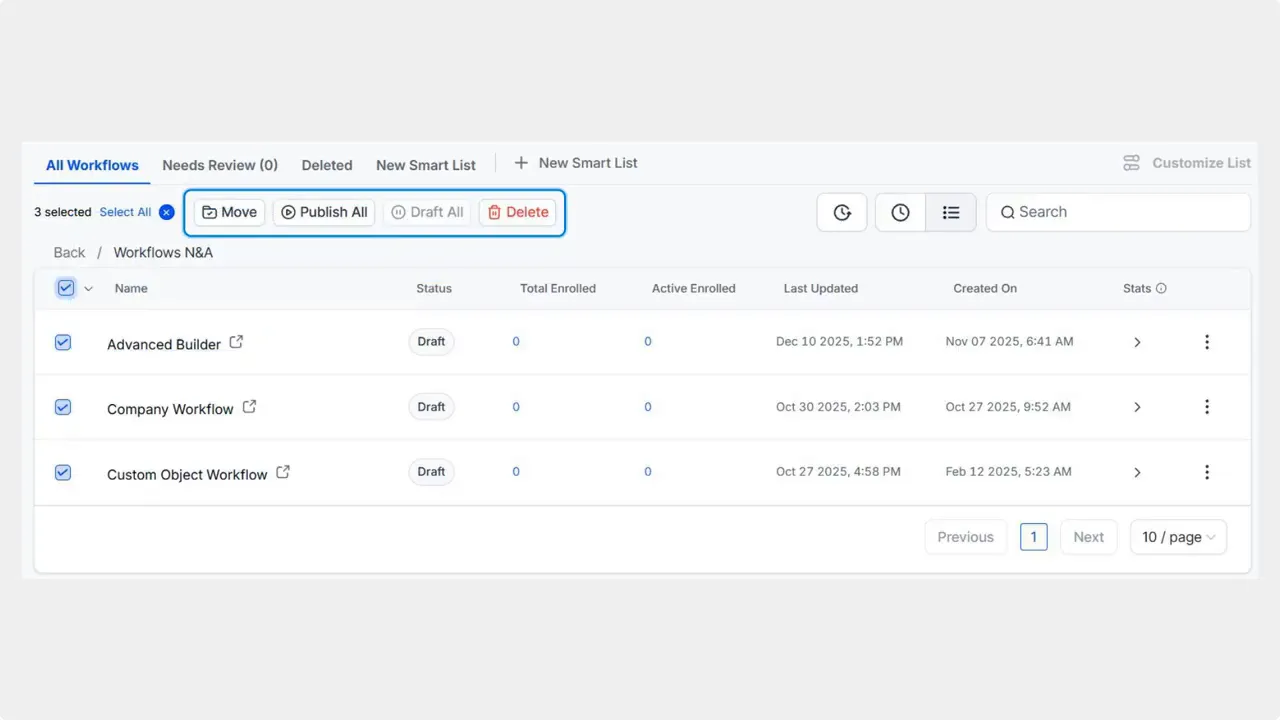
Workflows: move, delete, or change status in bulk.
Folders: move, delete, or manage access permissions for many folders at once.
How to use bulk select
Check the box next to each workflow or folder that we want to change.

Or use the group drop-down to pick a predefined set of items.

Choose the action that applies to the selected items. For workflows choose move, delete, or change status. For folders choose move, delete, or update access permissions.

Confirm the change and let the system apply it to all selected items.
Why this improves our operations
Bulk select removes repetitive manual labor. That makes our process faster and more consistent. With fewer clicks, we reduce the chance of error when updating many automations at once. The time saved can be redirected toward tasks that increase revenue and improve customer satisfaction.
Best practices for using bulk actions
Review selections before applying changes. Confirm that folders and workflows are correctly chosen.
Use groups in the drop-down to select commonly edited items quickly.
Manage permissions carefully when changing folder access. Permissions carry broad effects.
Start with a small set when trying a new bulk action so we can validate the result.
FAQ
What actions can we perform on multiple workflows at once?
We can move workflows between folders, delete multiple workflows, or change their status in bulk.
Can we bulk edit folders too?
Yes. For folders we can move them, delete them, or update access permissions for many folders at once.
How do we select a group of items quickly?
Use the group drop-down to pick a predefined set of workflows or folders instead of selecting each item manually.
Does bulk select improve consistency?
Yes. Applying the same action to multiple items at once ensures consistent status, location, and permissions across workflows and folders.
Any tips to avoid mistakes with bulk actions?
Double-check the selected items, start with a small sample when trying a new action, and review permission changes before confirming.
Final note
Bulk select is a simple change that saves time and reduces tedium. Use it to keep our automations organized and to focus our efforts on work that drives results.
This article was created from the video Bulk Select: Update Multiple Workflows at Once








