





Automate Review Responses: Product Review Submitted Trigger

Customer reviews are a powerful tool for improving our products and building trust in the marketplace. Left unmanaged, they become missed opportunities and points of disconnection. The Product Review Submitted trigger lets us act the moment a customer posts a review so we can respond faster, reward loyalty, and fix problems quickly.
Why automate review handling
Reviews shape buying decisions and reflect the real customer experience. Automating responses prevents delays, keeps engagement high, and reduces manual work for our teams. With the right workflows, we can:
Recognize and reward customers who leave positive feedback.
Resolve problems fast when ratings are low.
Ensure consistency in replies and follow-ups.
How to set up the Product Review Submitted trigger
Here’s a simple step-by-step process to add the trigger inside Automation → Workflows:
Create or edit a workflow in the Workflows tab of the Automation section.
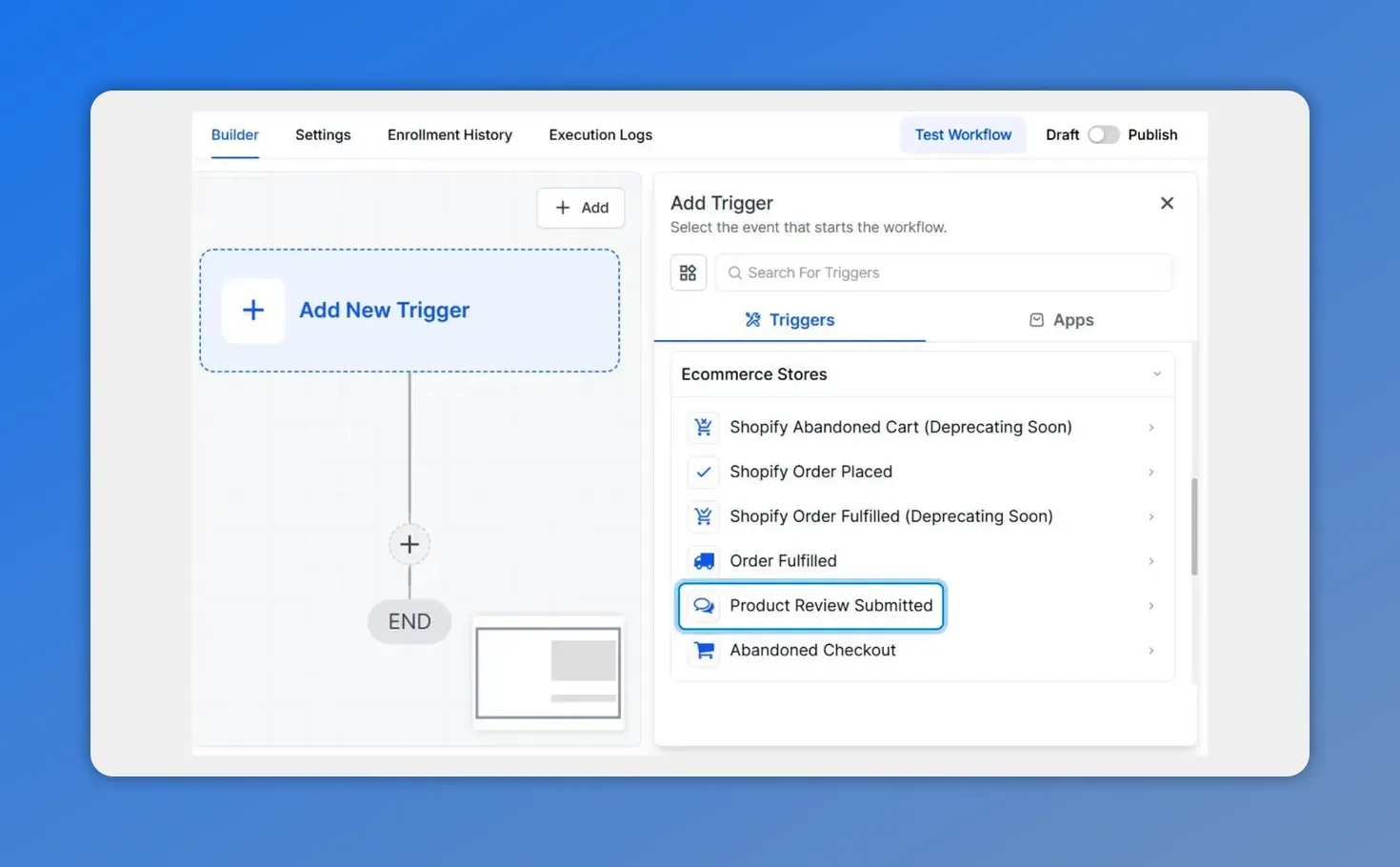
Select 'Product Review Submitted' from the Add Trigger panel to start the workflow.
Click Add New Trigger and choose Product Review Submitted from the Ecommerce Store category.
Click Add Filters to narrow when the trigger fires. Filters let you target specific products, users, or review attributes.

Open the Filters dropdown to pick fields like Global Product, Review Comment, or Rating.
Save Trigger to finalize and then build the next workflow actions.
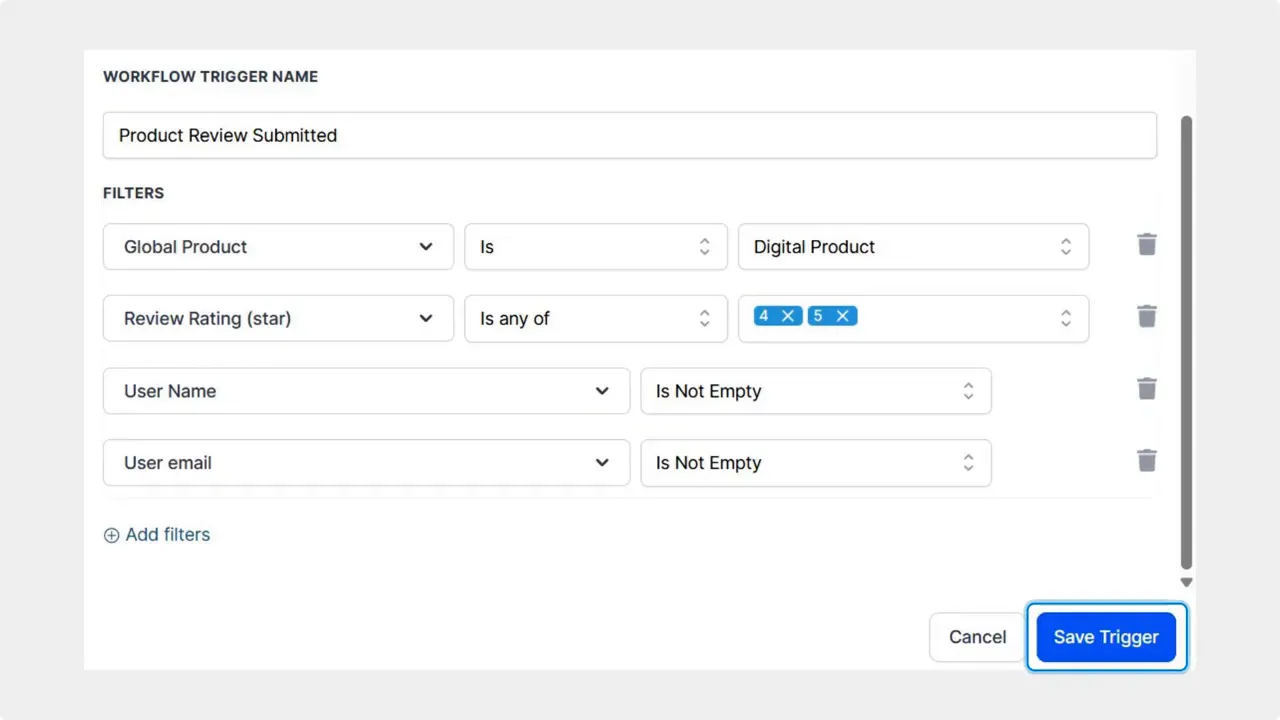
Final step: review the filters and click Save Trigger to finish the Product Review Submitted trigger.
Filters you can use
Filters control exactly when the trigger runs. Use them to match your goals and avoid unnecessary automation.
Product or Global Product — run only for specific items.
Username or Email — target known customers or internal accounts.
Review comment or Headline — look for keywords or phrases.
Rating — separate flows for 5-star praise and 1–2 star complaints.
Store name — useful for multi-store setups.
Actions and common use cases
Combine the trigger with existing actions to create helpful, automated follow-ups. Examples we use successfully include:
Immediate thank-you message after a positive review.
Reward delivery — discount codes, loyalty points, or special offers for enthusiastic reviewers.
Escalation for low ratings — route negative reviews to support for quick remediation.
Feedback collection — ask for more details when a review is vague or mixed.
Internal alerts — notify product or ops teams when a recurring issue appears.
Best practices
Segment by rating so praise and problems get the right response.
Personalize replies using reviewer fields like username or review headline.
Keep actions simple and test flows before rolling them out broadly.
Monitor outcomes and refine filters to reduce false positives.
FAQ
What does the Product Review Submitted trigger do?
It starts a workflow the moment a customer submits a product review. The trigger can be filtered so it only fires for specific products, ratings, reviewers, or stores.
Which filters should we use first?
Start with rating and product. Those two filters let you separate praise from complaints and ensure actions are relevant to the item reviewed.
Can we reward reviewers automatically?
Yes. Pair the trigger with reward actions such as coupon delivery or loyalty points. Use filters to only reward the reviews that meet your criteria.
How do we handle negative reviews?
Route low ratings into a follow-up sequence. Include an immediate acknowledgement, a support offer, and internal alerts for product teams when needed.
Will automation make responses feel robotic?
Not if we keep messages short and personal. Use the reviewer’s name, mention the product, and add a human touch. Reserve manual follow-up for complex issues.
Next steps
Open the Workflows tab, add the Product Review Submitted trigger, and set filters that match your goals. Then build actions to thank positive reviewers, reward loyalty, or escalate problems. Automating this process helps us act faster, deliver better experiences, and keep customer engagement high.
This article was created from the video Automate Review Responses: Product Review Submitted Trigger








