





Custom Templates for Recurring Emails in Reputation
Select, create, and edit the email you’re sending your customers depending on the number of requests you’ve sent in the past. Creating a personalized experience that entices customers to interact with your business and leave a review. Making it easy to improve your business and have a glowing reputation.
⭐️Why Is This Feature Beneficial To Your Company?
Email Variety: Keep the “Review Request” emails varied and engaging with this feature, helping you add different well-crafted emails that increase your response and review rates.
Simplified Customization: Create highly personalized emails for every attempt from customizable templates, ensuring your brand image is always present and you can make your messaging heard.
Professional Image: Ensure consistency and professionalism even when using multiple email formats, creating a feeling of security in contacts without increasing your workload.
⭐️How To Use Custom Templates for Recurring Emails?
Head to the Settings tab inside the Reputation section and switch to the Email Review Requests.

Enable Email Review Requests, set the frequency and total retries.

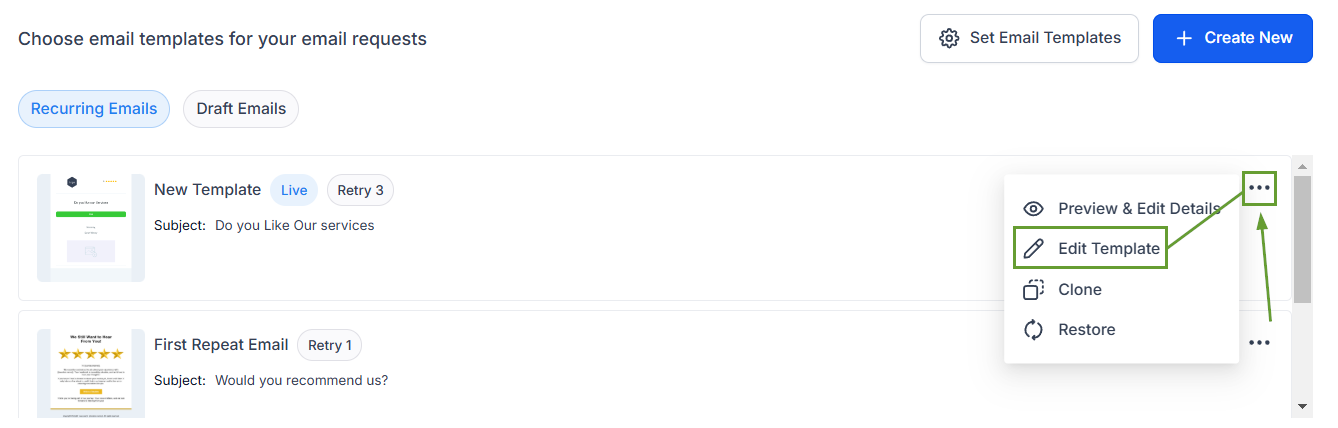
Choose different email templates for each follow-up message.

Click the three dots next to the template and select Edit Templates.
Encourage your customers to leave reviews for your business, increasing your social capital and helping you improve operations by using this feature to keep every request personalized and interesting.








